Introduction:
If you’re trying to figure out how to download CAS mutual fund statement covering every fund house you’ve ever invested with, the standard steps don’t always show you everything — as four real investors below found out the hard way. Learning how to download CAS mutual fund records correctly, and knowing where each method falls short, is the difference between a statement that looks complete and one that actually is.
What Is a CAS Mutual Fund Statement, and Why Do You Need One?
A Consolidated Account Statement (CAS) is a single document that pulls together every mutual fund transaction and holding registered against your PAN — across fund houses, across folios, across the years you’ve been investing. In theory, it’s the one place you should be able to see everything. In practice, as the four stories below show, “everything” depends entirely on which method you use to download your CAS mutual fund statement.
Before we get into methods, it helps to see where this actually goes wrong for real investors — because the fix is different each time.
Method 1: How to Download CAS Mutual Fund Statement via CAMS and KFintech
Deepak Rao, 58, retired from a public sector bank in Nagpur, started investing in mutual funds back in 2003 — long before online KYC existed. Every application was a paper form, filled out at a bank counter, with an agent’s signature and Deepak’s own in blue ink. No email address was ever attached to those folios, because in 2003 nobody asked for one.
When his son suggested he download his CAS mutual fund statement to see how those old investments had grown, Deepak tried the obvious route — the CAMS and KFintech CAS request portals:
- CAMS: camsonline.com → Investors → Statements → Consolidated Account Statement
- KFintech: mfs.kfintech.com/investor/General/ConsolidatedAccountStatement
Both portals asked for a registered email ID. Deepak didn’t have one on file. The CAS request simply failed — not because anything was wrong with his investments, but because the RTA had no address to send it to.
This is the single most common reason paper-era investors get stuck, and it isn’t fixed by trying the request again. The email has to be added to the KYC record first, through an AMC Investor Service Centre or the CAMS/KFintech KYC modification process, with PAN and folio proof. Only after that update goes through will a request to download CAS mutual fund records actually return anything.
For someone like Deepak, this is a one-time fix — but it has to happen before any of the other methods below will work either. It’s also worth noting that incomplete or outdated folio records can complicate more than just your CAS — our guide on Gujarat UCC inheritance rules covers how outdated documentation affects succession too.
Method 2: Using MFCentral to Download CAS Mutual Fund Statement in One Step
Ananya Krishnan, 33, works in product management in Bengaluru. Unlike Deepak, she’s about as digitally fluent as it gets — SIPs running through Zerodha Coin, a couple of direct funds bought on Groww, and one older fund her father had set up for her through a relationship manager years ago. When a friend mentioned MFCentral as “the one site that shows everything,” she tried it immediately.
MFCentral (mfcentral.com) is a joint portal run by CAMS and KFintech together, built specifically to let investors download a CAS mutual fund statement combining both RTAs in a single request. You enter your PAN and registered email, choose Summary or Detailed CAS, pick your period, and it pulls a combined statement across both RTAs in one document — no prior account registration needed.
Ananya’s statement came through fine. Except one thing was missing: the older fund her father had set up. She knew the folio existed — she’d seen the physical statement years ago — but it wasn’t showing on MFCentral at all.
The cause turned out to be simple once she checked: that older folio had been registered with her father’s email address, not hers, since he’d handled the paperwork at the time. MFCentral (like CAMS and KFintech individually) only pulls folios linked to the exact PAN-and-email combination you search with. A mismatched email — even on a folio that’s legally hers — won’t surface unless the email is corrected in KYC records first.
This is worth checking for anyone who’s invested through more than one agent, relative, or platform over the years: if a folio was opened under a different email than the one you’re currently using, it will silently not appear, with no error message telling you it’s missing. If you’d also like to see how your general mutual fund investing options in Surat stack up, our overview on mutual fund investment in Surat is a useful companion read.
Method 3: CDSL and NSDL — The Depository Statement Most People Forget
Rahul Menon, 40, grew up in Kochi and has been working in Dubai for the past twelve years. Alongside his regular mutual fund SIPs, he’d also bought a few ETFs and some direct equity through a broker account back home — all held in demat form.
When Rahul used MFCentral to download his CAS mutual fund statement ahead of a home loan application, it showed his regular mutual fund folios correctly. What it didn’t show were his ETF holdings. That’s because ETF units exist only in dematerialised form — they’re never processed through CAMS or KFintech at all, so no RTA-based CAS, however complete, will ever include them.
For anyone holding investments through a demat account — ETFs, or mutual fund units bought via a broker platform in demat mode — the depository statement from CDSL (cdslindia.com) or NSDL (nsdl.co.in), whichever your demat account sits with, is a separate document that has to be pulled alongside the RTA-CAS. Together, the two give a genuinely complete picture; either one alone won’t.
Rahul had one more complication on top of this: the mobile number linked to his demat account was an old Indian number he’d stopped using after moving to Dubai. Several of the request and verification steps depend on OTP access to that number, so before he could pull either statement cleanly, he had to update his registered mobile and email with his depository participant — a step NRIs in particular tend to miss until they actually need the document.
Special Case: Why CAS Mutual Fund Statements Don’t Show PMS or AIF Holdings
Vikram Oberoi runs a hosiery manufacturing business in Ludhiana. Over the past several years, as the business grew, so did his investments — mutual fund SIPs, a Portfolio Management Service allocation, and more recently an Alternative Investment Fund. When it came time to review his full net worth for a bank loan discussion, he downloaded his CAS mutual fund statement on MFCentral, expecting to see all of it in one place.
The mutual fund portion was accurate. The PMS and AIF numbers simply weren’t there — and for a moment, Vikram wondered if something had gone wrong with those investments.
Nothing had. A CAS mutual fund statement is scoped to mutual funds by design — it’s generated by the mutual fund RTAs, CAMS and KFintech, and has no visibility into PMS or AIF structures at all. Those are reported directly by the portfolio manager or AIF fund manager, typically through their own dedicated statements, and they follow entirely separate reporting, taxation, and disclosure rules from mutual funds.
For someone like Vikram — MF, PMS, and AIF all running simultaneously, sometimes through a family business structure — no single free government-linked statement will ever show the combined picture. That reconciliation has to be done by pulling each statement separately, or through a distributor who already tracks all three for you. Business owners structuring investments through a family entity may also find our comparison of HUF for estate planning relevant, since HUF-held folios follow their own separate CAS record too.
Troubleshooting: CAS Password Issues and Historical Statements
A few practical snags come up often enough to cover directly:
CAS password not working? The default password on both CAMS and KFintech CAS PDFs is your PAN in uppercase (for example, ABCDE1234F). If that doesn’t open the file, the most common cause is that the CAS was generated using a different PAN than the one you’re entering as the password — this happens with joint holdings, where the statement reflects the first holder’s PAN regardless of who requested it.
Need a full history, not just the current year? All three portals — CAMS, KFintech, and MFCentral — let you request a “statement from inception” when you download your CAS mutual fund history, which generates the complete transaction history from the date each folio was opened, rather than just the current or previous financial year. This is the version worth pulling if you’re trying to track long-term SIP performance or reconstruct an old investment’s full history.
CAS Mutual Fund Statements for Loans and Tax Filing
Two situations where a CAS becomes more than a reference document:
Loan against mutual funds: banks and NBFCs typically accept a CAS as proof of the portfolio being pledged as collateral, provided it isn’t older than 30 days. This is the exact situation Rahul and Vikram were both preparing for.
Income tax filing: a Detailed CAS provides the transaction history needed to compute capital gains for Schedule CG in ITR-2 or ITR-3. It’s also worth cross-checking your CAS figures against the Annual Information Statement (AIS) on the income tax portal, which independently aggregates the same transaction data reported by RTAs — a useful way to catch discrepancies before filing. If estate and succession planning is also on your mind, our guide to writing a Will in Gujarat explains how mutual fund holdings should be reflected there too.
Step-by-Step: How to Download CAS Mutual Fund Statement
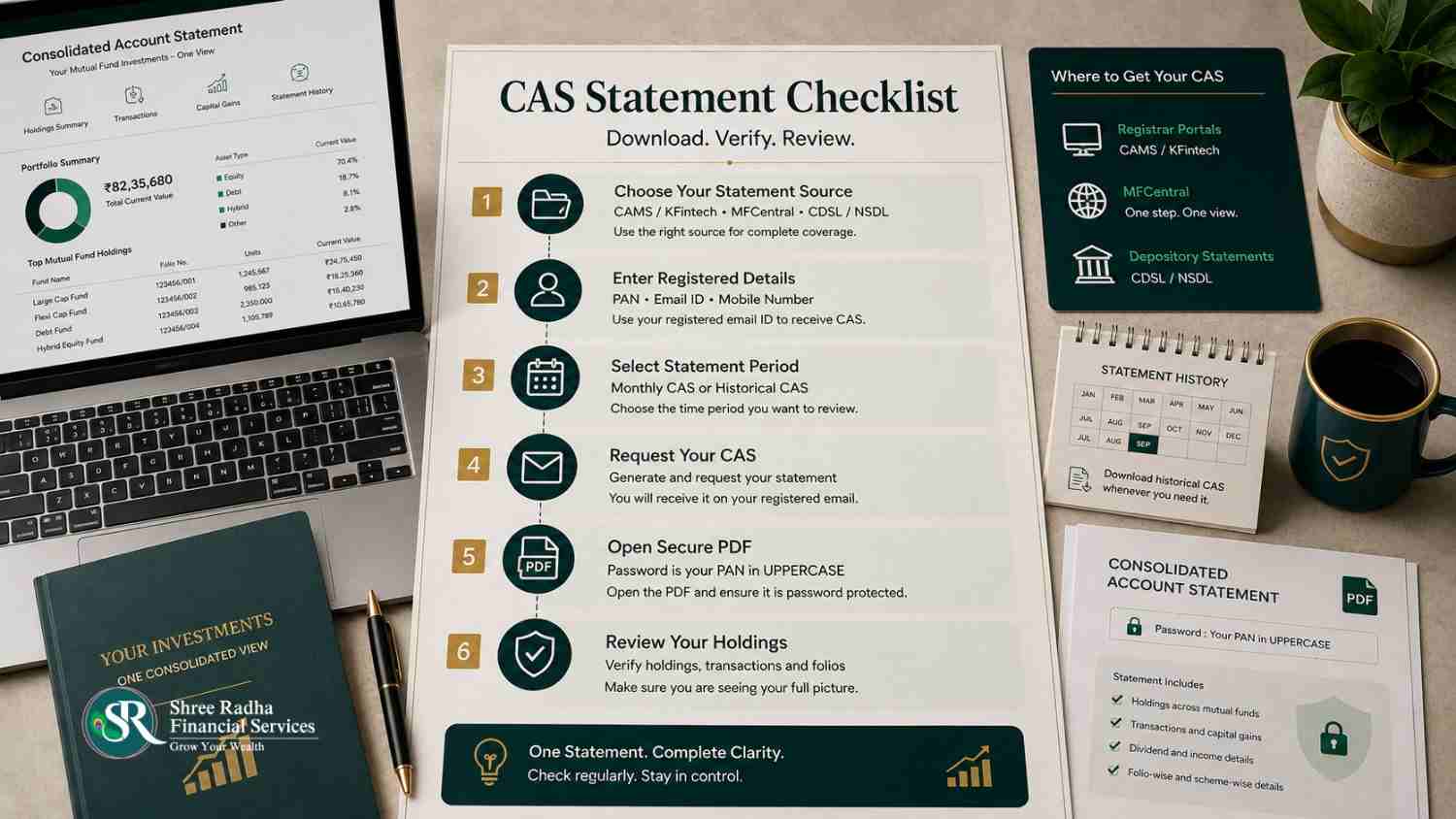
- Decide what you’re checking for — mutual funds only, or mutual funds plus demat/ETF holdings.
- Go to mfcentral.com to download your CAS mutual fund statement combined across CAMS and KFintech, using your PAN and registered email.
- If a folio seems to be missing, request CAMS and KFintech statements individually to isolate which RTA holds it, and check whether the email on that folio matches the one you searched with.
- If you hold ETFs or mutual fund units in demat mode, request a separate statement from your depository — CDSL or NSDL, depending on where your demat account sits.
- Choose Detailed CAS and a “since inception” or 6–12 month period if you want to track SIP progress or gains — a single month’s statement won’t show this.
- Open the PDF using your PAN (uppercase) as the password.
- If you also hold PMS or AIF investments, request those statements directly from the respective fund manager — they won’t appear in any CAS mutual fund statement.
- If a folio still doesn’t show up anywhere, it’s almost always a KYC email/PAN mismatch — get that updated at your AMC’s Investor Service Centre before requesting again.
“In three and a half years of doing this at SR Wealth, the CAS question I hear most often isn’t ‘how do I download it’ — it’s ‘why doesn’t this match what I actually own.’ Almost every time, it’s not an error. It’s a document that was only ever built to show one piece of the picture.” — Paresh Chaudhary, Founder, SR Wealth
Frequently Asked Questions
Why am I not receiving my monthly CAS on my email?
Monthly CAS is sent automatically to the email registered on your folio, but only if there was a transaction that month. If you have multiple folios with different emails on file, SEBI’s dispatch rules use the email linked to whichever folio was opened earliest — which may not be the email you check regularly.
How do I open my CAMS/KFintech CAS mutual fund PDF?
Use your PAN in uppercase as the password. If it doesn’t work, check whether the statement was generated for a joint holding, where the first holder’s PAN is used instead.
Can I download CAS mutual fund statement without a registered email ID?
No — CAS generation depends on having an email linked to your folio in KYC records. If you don’t have one, you’ll need to update it through your AMC or the CAMS/KFintech KYC modification process first.
What is the difference between a CAMS+KFintech CAS and an NSDL/CDSL CAS?
The CAMS/KFintech (or MFCentral) CAS mutual fund statement covers mutual fund folios processed by those two RTAs. The NSDL/CDSL statement covers holdings in your demat account, including ETFs and any mutual fund units bought in demat mode. They cover different things and neither replaces the other.
Does CAS include direct and regular mutual fund schemes together?
Yes — CAS shows both direct and regular plan holdings together, since it reflects everything registered under your PAN regardless of which plan type or distributor was used.
How far back can I download my CAS mutual fund history?
All three portals — CAMS, KFintech, and MFCentral — allow a “statement from inception” request, which covers the complete transaction history from when each folio was first opened. See the official AMFI Download CAS page for direct RTA links.
Not Sure If You’re Seeing Your Full Picture?
If you’re juggling mutual funds across multiple RTAs, demat holdings, and possibly PMS or AIF investments on top, reconciling all of it yourself can be genuinely tedious. As an AMFI Registered Mutual Fund & SIF Distributor (ARN-268390) and APMI Registered PMS Distributor (APRN-05763), Paresh at SR Wealth can help you get a single, complete view of everything you hold.
Call/WhatsApp: +91 98791 13255
Email: shreeradha.services@gmail.com
Website: www.srwealth.co.in
Address: Shop 33, Mira Nagar 2, Dindoli Road, Surat 394210
About the Author: Paresh Chaudhary is the founder of Shree Radha Financial Services (SR Wealth), an AMFI Registered Mutual Fund & SIF Distributor (ARN-268390) and APMI Registered PMS Distributor (APRN-05763), based in Surat, Gujarat.
Disclaimer: This article is for educational purposes only and does not constitute investment advice. Shree Radha Financial Services (SR Wealth) is a distributor, not an investment adviser, and does not recommend, endorse, or guarantee the performance of any scheme. Please consult your own financial and tax advisors before making investment decisions.